

Visual workflows that detect every change in your catalog, decide what to do with it, assign work to your team and keep a record of everything. With or without AI. No code.

Any source of change
With or without AI
Every decision on record
Your catalog never stands still and your team can't be everywhere. Changes arrive from the ERP, suppliers, imports, the API, AI agents and dozens of people.

Decides whether a change gets in and on what terms, wherever it comes from: the ERP, an import, the API, an agent or a person.

Checks Quality Score, validations, tags and consistency across tables. With AI when the criterion doesn't fit in a rule.

Creates tasks with a due date and a priority for the right person or team, with only the fields that concern them. No emails.

Who, what, when and why. Including when the machine decides: every automatic decision can store its reason.
At every step you choose the level of control, and you can change your mind with one click. We don't promise the machine will do it all alone: we promise you decide where to stand.
.svg)

Set your criteria. Quality Score, validations, consistency with the technical attributes and let the workflow approve what meets them and escalate only what raises doubts. And every automatic decision can store which criteria it evaluated and why it decided that way.
Autopilot Workflows is not an AI feature: it is the layer that governs your catalog. It works with your AI Agents, and just as well without them.

The trigger fires on the field edit
It fills the field with a formula, without asking anyone
Nobody touches a thing. The PIM working quietly

Only on the products inside the workflow's scope
The workflow calls the agent you picked for the job
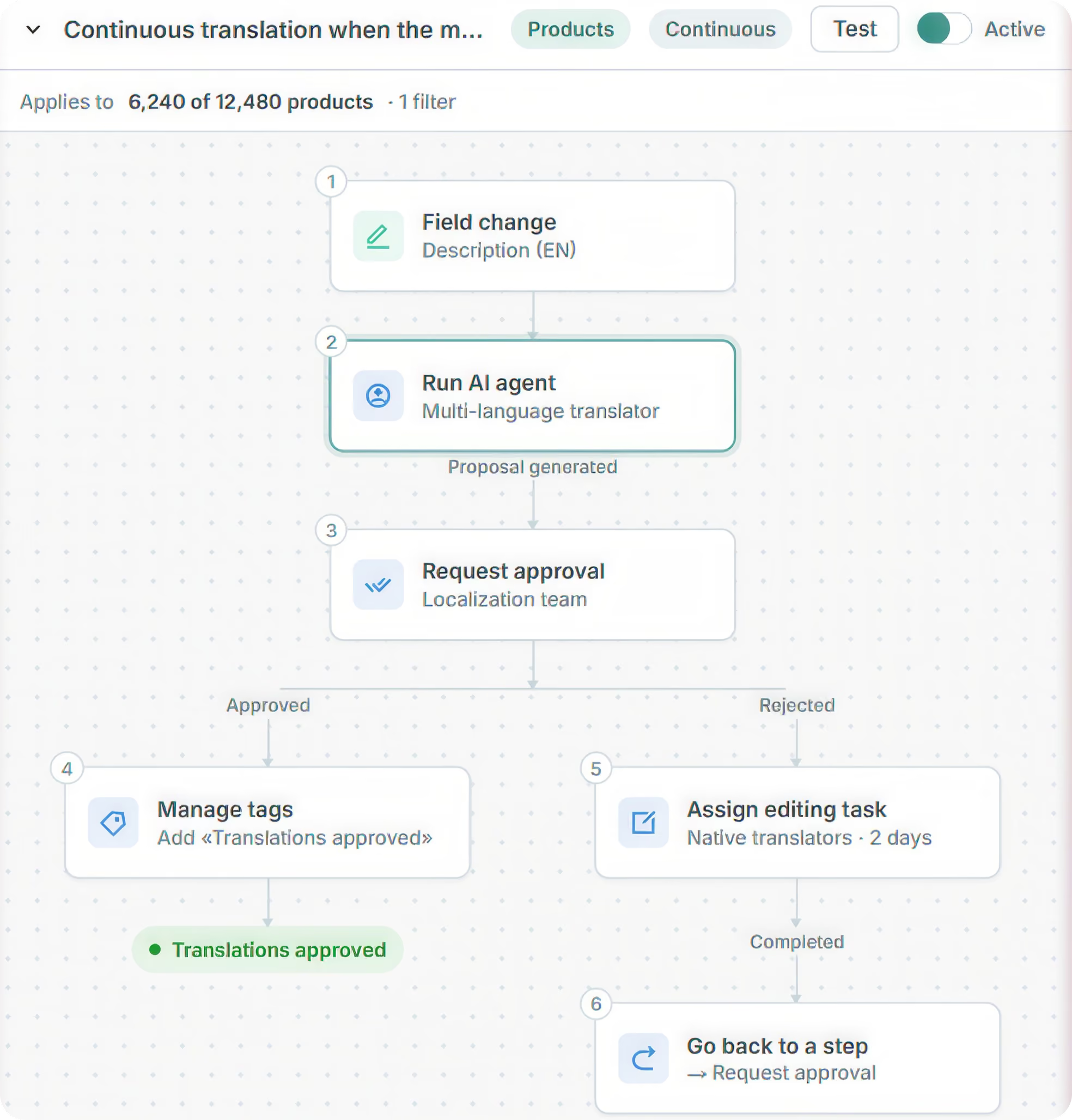
If they reject it, it goes to a native translator with a deadline
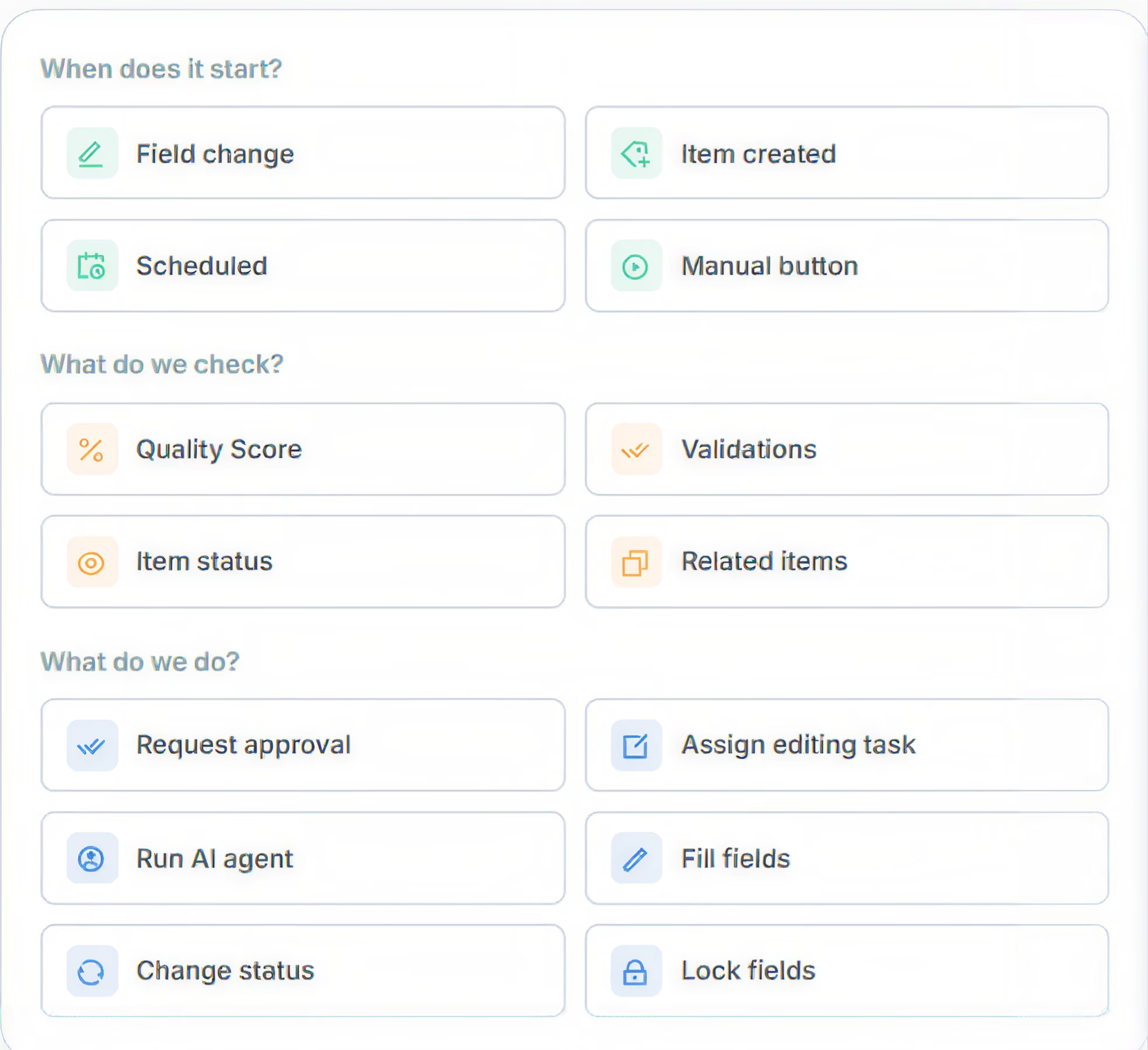
Triggers, conditions, actions and endings that combine freely on a visual canvas. You choose which part of the catalog each workflow applies to, test it on a real product, and only then switch it on.
.svg)
A change on a product acts on its variants.

One workflow can launch another and wait for its result.
.svg)
Every Monday at 8:00, without waiting for anything.
.svg)
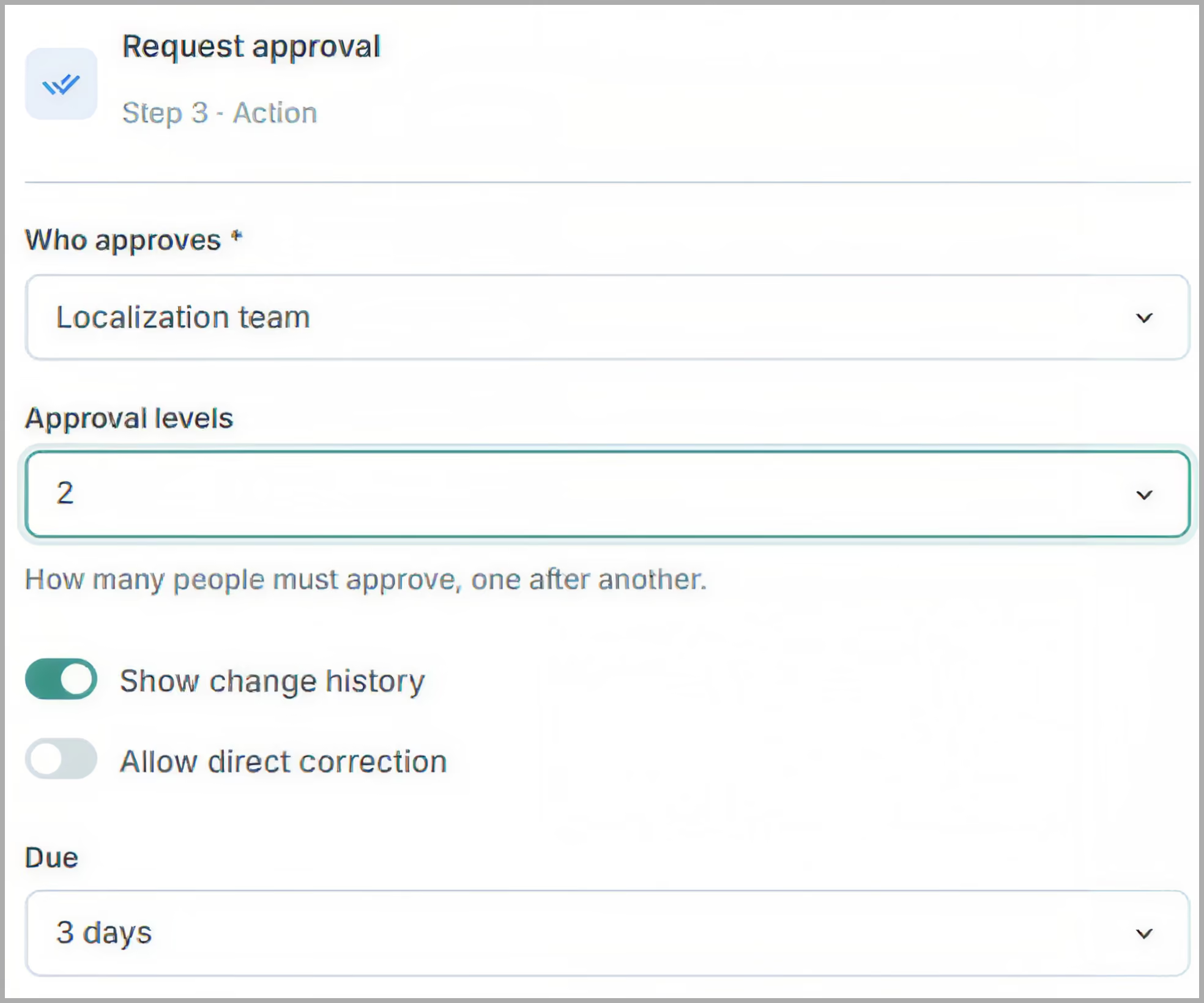
One or several approvals before publishing.
Four of the processes that eat the most time, solved as workflows.
You change the English description and, without anyone doing a thing, the localization team receives the proposed translations to review. If they reject them, a native translator fixes them within two days.
The ERP creates the product at midnight. By 8 in the morning the Master Data team has the task assigned, the agent has proposed a description and the content lead only has to approve. The variants go to Visible with the product.
Nobody publishes a product with a low Quality Score, failed validations or variants that aren't ready. The «Send to publication» button guarantees it, with two levels of approval before going to Visible.
You change net and gross weight, and volume and the logistics tag update instantly. Nobody touches them. No AI, no humans: the perfect example of a silent workflow.
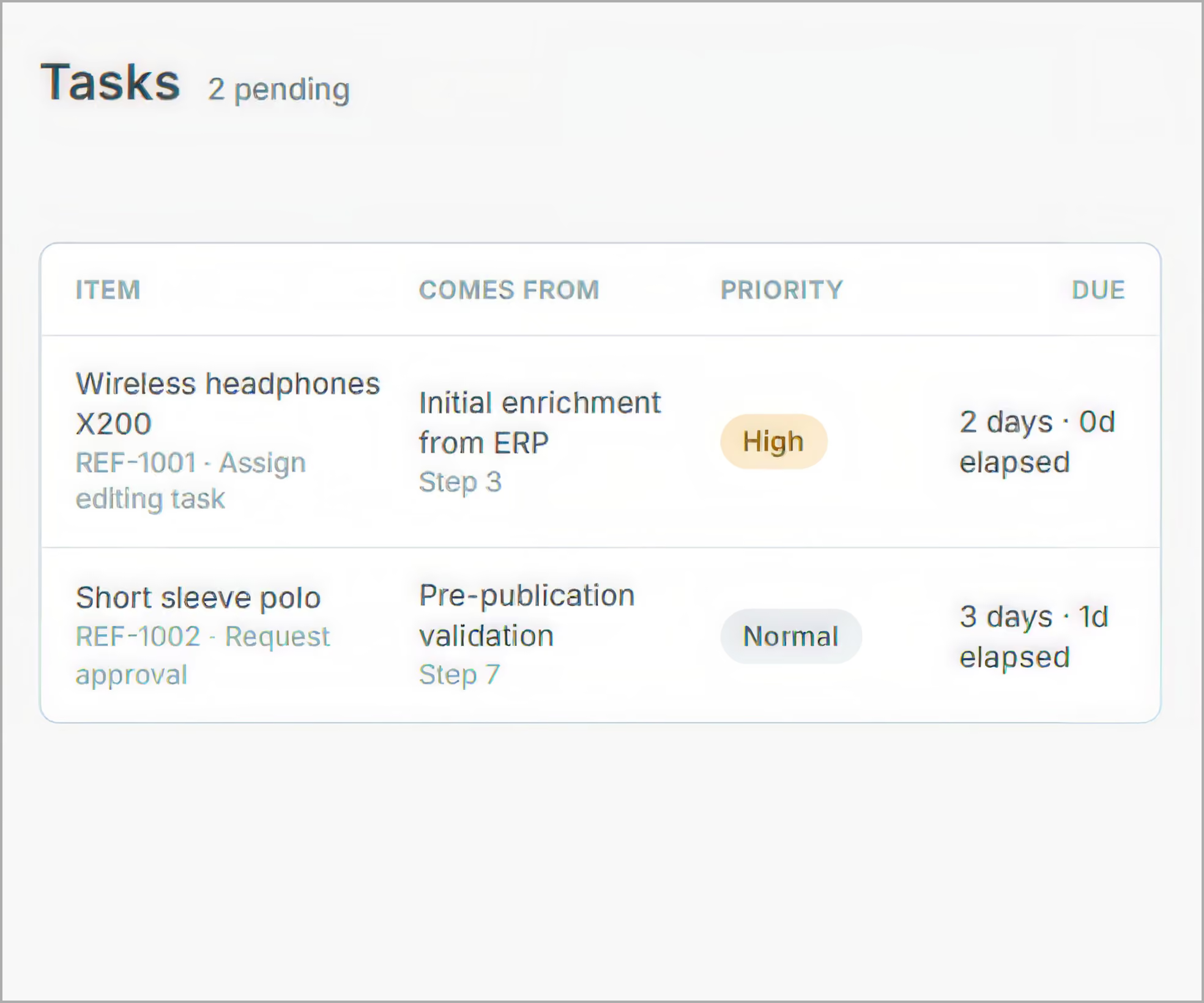
Every person has their own Cockpit: pending tasks, reviews, urgent by deadline and overdue. Open each task in a form, in spreadsheet mode with only the columns that concern them, or item by item in sequential mode.
Every run leaves a readable trace: item, trigger, steps, timings, owner and outcome. Automatic decisions can store the criteria evaluated and their justification. Auditable, with no extra work.
Agents are the specialists and the API and MCP Server are the doors to the outside. The workflow decides who comes in and keeps the record.
Governance layer: gates, reviews, assigns, records
AI Agents
Specialists with their own skills
People
Editors and reviewers
Outside world
REST API, MCP Server and partner apps
.svg)
The AI professionals that translate, write and categorize. The workflow decides when they work and reviews what they produce.
Connects your PIM to external AI tools. Anything they send in still follows your existing workflows, rules, and approvals too.

Your integrations keep working just the same. The workflow governs what comes in through them, it doesn't compete with them.
No. Autopilot Workflows works fully without any AI agent. It can fill derived fields with formulas, change statuses, manage tags, lock fields, assign tasks to people and request approvals without any artificial intelligence involved. AI Agents are one more piece that the workflow can call when you decide.
The agent transforms data: it translates, writes, categorizes or applies rules to the content of the fields. The workflow governs the process: it decides when each agent or person acts, reviews what they produce, assigns tasks, requests approvals and keeps a record of everything. Agents do the work; workflows decide who works.
Yes. A workflow can be triggered by a change in one table and act on a related one: a change on a product can act on its variants or on its sales material, and the other way around. It can also check conditions on the linked items before carrying on.
They go through the same workflows as a manual change. The trigger can filter by the source of the change, so you can treat what arrives from the ERP, from a connector, from the API or from a person differently. Your integrations don't compete with workflows: they are governed by them.
You can carry on automating from the outside with our API and our MCP Server. The difference is where the process lives. Outside the PIM you work with copies of the data and you don't know the families, the validations, the Quality Score or the permissions. Inside Workflows those pieces are part of the flow, there is one single version of the truth and one single history. And at a scale of tens of thousands of products, orchestrating from the outside drives up time, cost and the difficulty of keeping the trace.
You can require human approval at any point of the flow, so nothing an agent produces is applied until someone signs off. The AI never publishes without you having allowed it. And when you do let the system decide on its own, automatic supervision can record the criteria evaluated and the justification of every decision.
They become one more piece of the workflow, with more capabilities: deadline, priority, instructions and contextual spreadsheet mode. Everything a reviewer does today they will carry on doing, with the change history in front of them and the option of multi-level approval. The transition comes with support.
With the same Sales Layer credit model you already know from the AI Agents. Steps that don't use AI consume computing credits, which are cheaper; you only spend AI credits on the steps where an agent is involved.